Introduction: why reusable prompt components matter
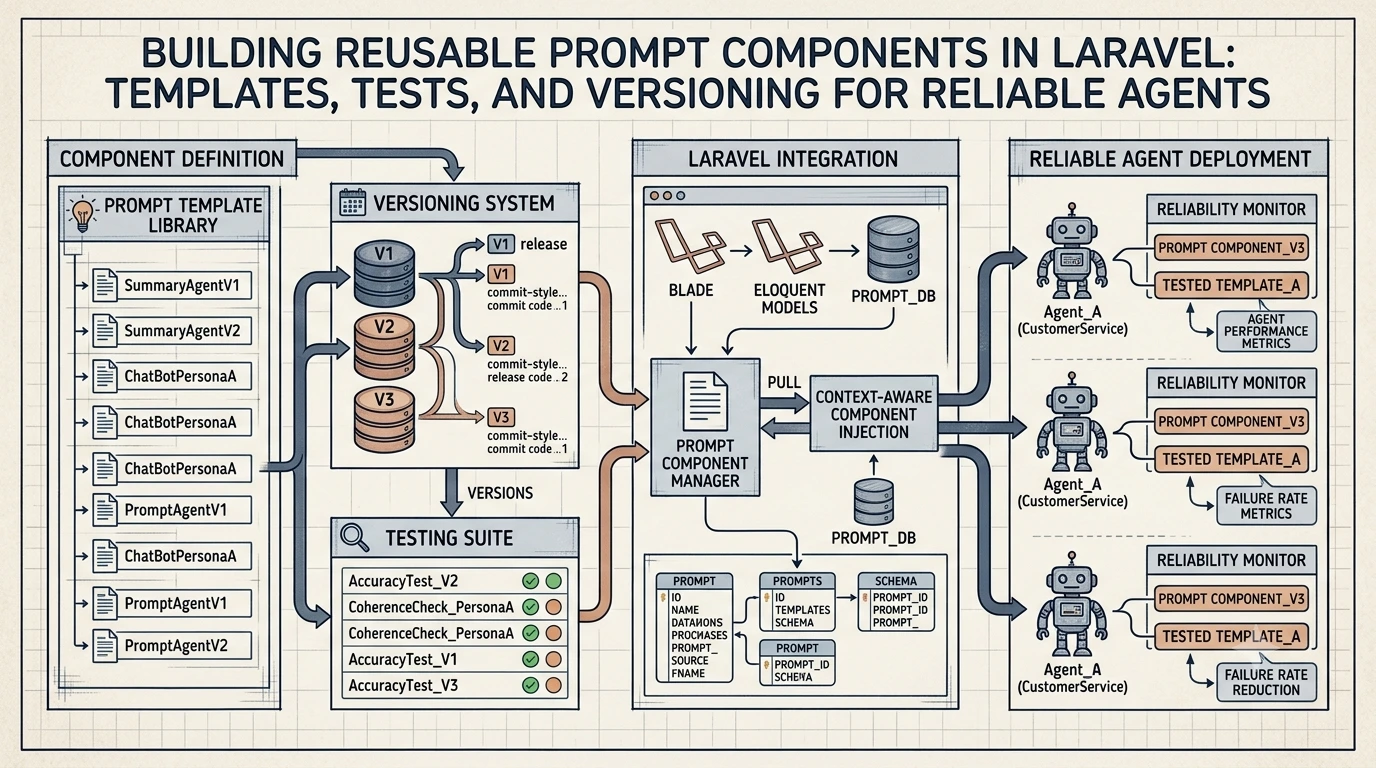
When you ship agents in production, the single biggest source of flakiness is the prompt layer: ad-hoc instructions, inconsistent variables, and undocumented expectations. Reusable prompt components (templates, a searchable prompt library, versioning, and automated tests) turn brittle prompts into reliable software artifacts. This article shows a practical approach in Laravel: how to organize prompt templates, test them, and version them so agents behave predictably in production.
Core concepts and goals
Before we jump into code, define the outcomes you want from reusable prompt components:
- Discoverability — prompts are findable and self-describing in a library.
- Reusability — templates are parameterized and composable across agents.
- Testability — templates have unit and integration tests that guard behavior.
- Versioning — changes are traceable; you can roll back or run migrations when prompts change.
- Observability — runtime use of prompts is logged and monitored for drift.
Designing prompt components in Laravel
Keep prompts first-class code artifacts. Store each prompt template with machine-readable metadata and examples. A minimal structure:
- app/Prompts — PHP classes or simple JSON/YAML files representing templates.
- database/migrations — versioned storage if you need DB-backed publishing.
- tests/Prompts — unit and snapshot tests for each template.
- resources/prompt-examples — positive/negative examples, sample inputs/outputs.
Prompt metadata
Each template should include metadata used by engineers, agents, and CI:
- id and version (immutable identifiers)
- purpose/intent
- required variables and types
- safety or privacy notes
- example inputs and expected outputs
Example prompt template class
A small, testable PromptTemplate class keeps rendering logic consistent. This sample uses simple variable replacement and a metadata structure. Adapt to a real templating engine if needed.
<?php
namespace App\Prompts;

class PromptTemplate
{
public string $id;
public string $version; // e.g. 1.0.0
public string $template;
public array $required = [];
public array $examples = [];

public function __construct(array $meta)
{
$this->id = $meta['id'];
$this->version = $meta['version'];
$this->template = $meta['template'];
$this->required = $meta['required'] ?? [];
$this->examples = $meta['examples'] ?? [];
}

public function render(array $vars): string
{
foreach ($this->required as $key) {
if (!array_key_exists($key, $vars)) {
throw new \InvalidArgumentException("Missing required var: {$key}");
}
}

// Lightweight rendering: {{name}} -> value
$output = $this->template;
foreach ($vars as $k => $v) {
$output = str_replace("{{{$k}}}", (string) $v, $output);
}

return $output;
}
}
Catalog and prompt library
Treat your prompt store like a package registry. Whether you keep templates as PHP classes, JSON files, or records in a DB, expose a registry API that returns metadata and a rendered prompt for a given version.
- Searchable fields: id, intent, tags, author, created_at, safety_level.
- Access control: restrict who can publish or mark a prompt as “stable”.
- Examples and tests should be bundled with each prompt so CI can validate changes.
Prompt versioning strategies
Prompt versioning is how teams avoid surprise regressions when prompt text changes. Use the same principles as code versioning, with a few prompt-specific rules:
- Immutable versions: Once published, a version should not change. Publish a new semantic version for edits.
- Semantic intent: Use semver-like tags: patch for wording tweaks, minor for capability additions, major for behavior changes.
- Tagged channels: keep "latest", "stable", and release candidates for safe rollouts.
- Migrations: supply migration guides and tests for agents that need to upgrade templates.
Example DB fields for a prompt record: id, version, template, hash, author_id, changelog, stable (bool), created_at.
Testing prompts
Testing prompts is different from typical unit tests. Combine multiple layers:
- Unit tests — validate rendering, required variable validation, and template helpers.
- Snapshot tests — assert rendered outputs for example inputs and keep diffs under review.
- Integration tests — mock the LLM or use a canary model to verify the end-to-end output structure (not exact text).
- Behavioral tests — assert that the agent performs the expected action given a prompt (e.g., returns JSON with required keys).
PHPUnit example: unit test + snapshot
<?php
use App\Prompts\PromptTemplate;
use PHPUnit\Framework\TestCase;

class RefundInstructionPromptTest extends TestCase
{
public function test_renders_required_fields()
{
$meta = [
'id' => 'refund_instruction',
'version' => '1.0.0',
'template' => "You are a support agent. Customer: {{customer_name}}. Issue: {{issue}}.",
'required' => ['customer_name', 'issue'],
];

$prompt = new PromptTemplate($meta);

$rendered = $prompt->render(['customer_name' => 'Alex', 'issue' => 'double charge']);

$this->assertStringContainsString('Alex', $rendered);
$this->assertStringContainsString('double charge', $rendered);
}

public function test_snapshot_example()
{
$meta = include __DIR__ . '/../resources/prompts/refund_instruction.meta.php';
$prompt = new PromptTemplate($meta);

$rendered = $prompt->render($meta['examples'][0]['input']);

// Save an approved snapshot to tests/__snapshots__/refund_instruction.txt
$approved = file_get_contents(__DIR__ . '/__snapshots__/refund_instruction.txt');
$this->assertEquals($approved, $rendered);
}
}
Snapshot diffs should fail CI, requiring reviewers to confirm semantic changes before accepting them.
CI/CD and release workflow
Integrate prompt checks into your CI pipeline:
- Run unit and snapshot tests on every prompt change.
- Run behavior and integration tests against a mocked or sandbox LLM client in a nightly job.
- Gate publishing: require code review and passing tests before marking a prompt version “stable.”
- Use canary agent deployments when updating prompts that affect critical flows.
Runtime observability and drift detection
Testing before release isn’t enough. Log prompt usage and outputs so you can detect drift or regressions in production:
- Log prompt id, version, rendered text hash, model used, and the response (or response summary).
- Run automated checks that compare production outputs to expected schemas or example outputs.
- Alert when the distribution of response types changes (for example, missing JSON keys or increased hallucinations).
For larger deployments, pairing observability with curated context (for example, tool access via MCP servers) helps agents use the right tools and stay predictable — see our note on giving agents access to PDF tools for an example of integrating tool chains: Foxit MCP Server.
Practical considerations and patterns
- Keep templates small and composable: compose small instruction blocks rather than one enormous prompt.
- Parameter types and validators: define types for variables (string, enum, list) and validate inputs before render.
- Example-driven development: add golden examples for every prompt and keep them in version control.
- Human-readable changelogs: require a human note explaining why a prompt changed and what behavior to expect.
- Security: ensure prompts do not leak PII or secrets. Mark templates that may include sensitive data and handle redaction in logs.
When to treat prompts as code vs content
Small wording tweaks that don't change behavior can be handled by content owners with strict CI checks. Changes that affect structure or expected outputs should follow the same review and release rules as code — tests, version bump, and a migration plan for consumers.
Wrapping up
Reusable prompt components make agent behavior repeatable, auditable, and testable. In Laravel, treat prompt templates as first-class artifacts: add metadata, pack examples, run snapshot and behavioral tests, and version changes deliberately. Combined with runtime logging and CI gates, this approach reduces surprises in production and makes agent work maintainable as your product scales.
Make prompts behave like code: discoverable, testable, versioned, and observable. That discipline turns AI prompts from experimental text into reliable application components.
Further reading: our knowledge base discusses broader implications of AI rebuilding apps and testing patterns for AI components: AI Won’t Just Build the Next App. It Will Rebuild the Old Ones.
Frequently Asked Questions
What are reusable prompt components and why use them?
Reusable prompt components are parameterized, versioned prompt templates with metadata and tests. They make agent behavior predictable, discoverable, and auditable, reducing production surprises caused by ad-hoc prompt edits.
Can I use Laravel Blade for prompt templates?
You can, but use Blade carefully. Blade supports logic and conditionals which can make prompts harder to reason about. Prefer minimal templating (variable substitution and simple helpers) and keep logic in PHP classes so templates remain declarative and testable.
How should I version prompts?
Use immutable versions (semantic versioning). Treat wording tweaks as patch releases, capability additions as minor, and behavior changes as major. Keep tags like stable and latest and require reviews for publishing new stable versions.
What tests should I run for prompts?
Combine unit tests (rendering and validation), snapshot tests (approved outputs for examples), integration tests (mocked LLM responses), and behavioral tests (agent-level expectations such as returning required JSON fields). Run these in CI.
How can I detect prompt drift in production?
Log prompt id/version, rendered text hash, model used, and responses. Monitor schema compliance, key frequencies, and summary metrics (e.g., hallucinations). Alert when output distributions change substantially from the baseline.