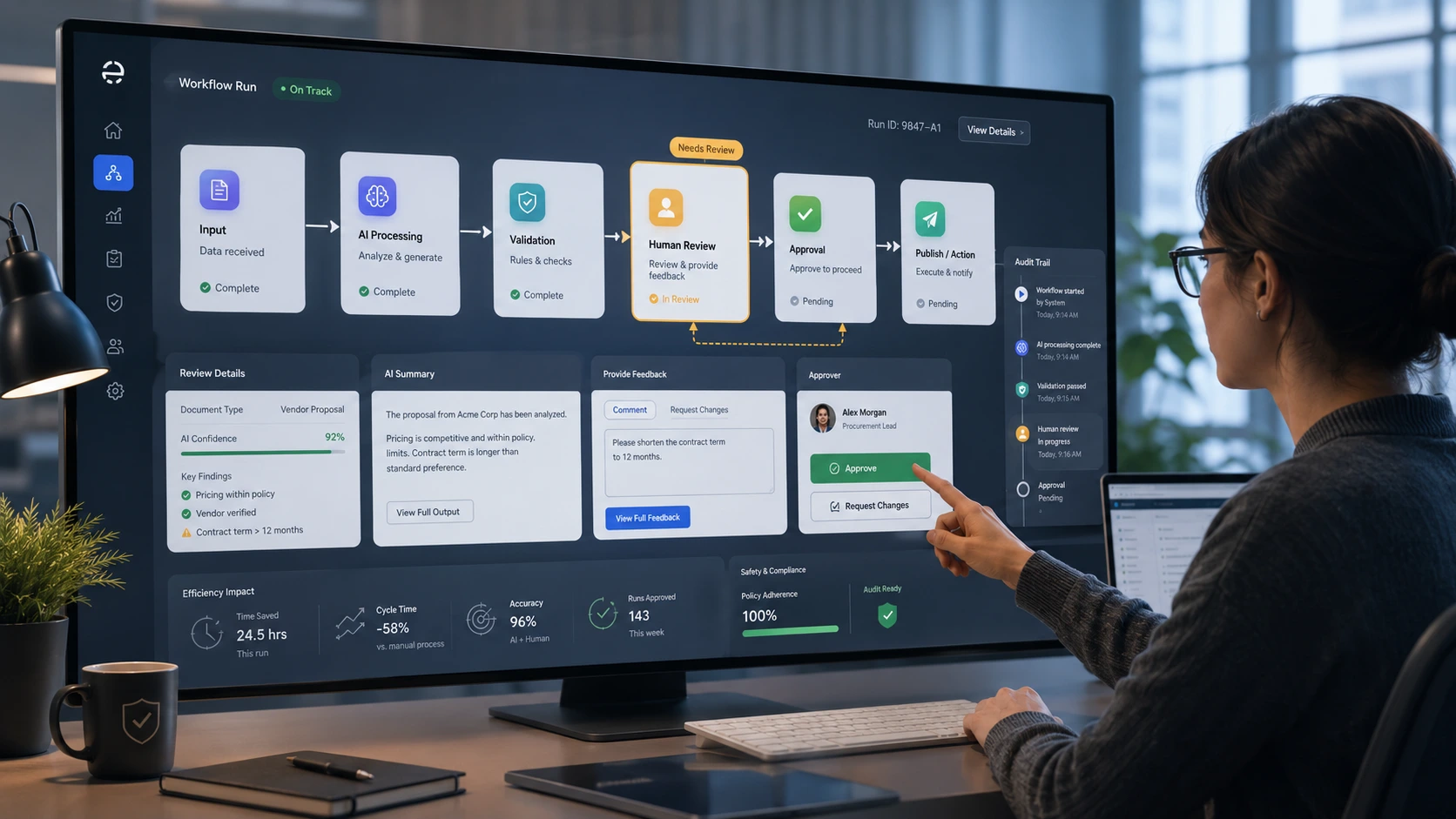
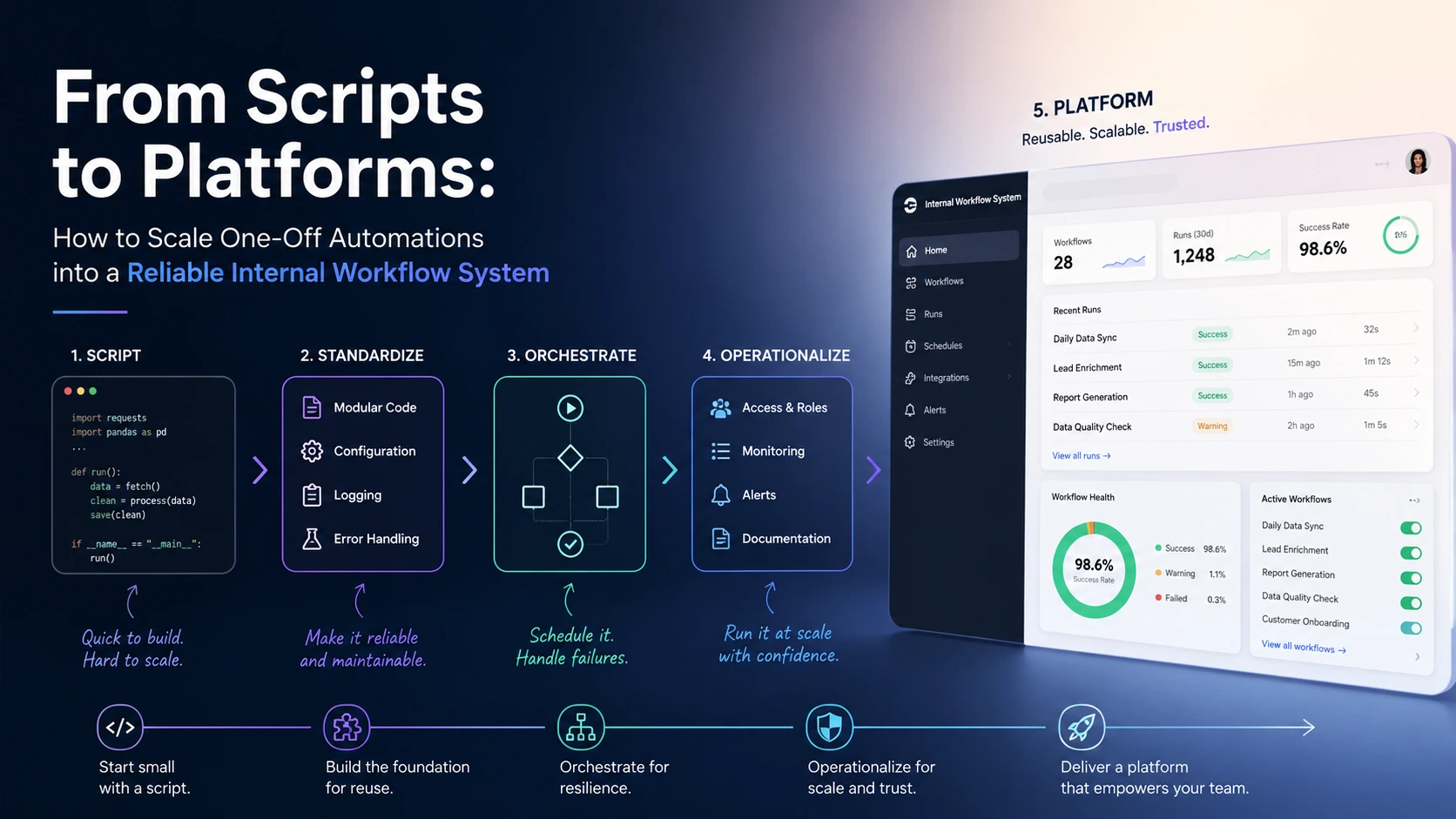
Small scripts and one-off cron jobs are how most automation programs start: fast to write, immediately useful, and often forgotten until they fail at 3 a.m. Scaling automation means turning those brittle point solutions into reliable, maintainable services or an internal platform that teams can trust. This guide explains when to stop piling duct tape on scripts, how to choose the right target (service, workflow engine, or internal developer platform), and the pragmatic, low‑risk path to migration.
Why one-off scripts stop working at scale
Scripting is excellent for speed, but the following properties make scripts fragile as your organization grows:
- Lack of observability: no structured logs, tracing, or metrics.
- Fragile scheduling: ad hoc cron entries or developer machines as runtimes.
- No ownership or SLAs: unclear who fixes failures out of hours.
- Hidden state and non‑idempotent behavior: scripts that cannot be retried safely.
- Secrets and configuration scattered across machines or individual developer environments.
These problems compound as frequency, concurrency, or business impact grows. Recognizing the tipping point is the first step toward scaling automation responsibly.
Signals that it's time to migrate: a pragmatic checklist
Migrate a script when one or more of these apply:
- Repeated failures or manual interventions: failures need human touch to recover more than once a month.
- Business impact: the task supports revenue, compliance, or customer experience.
- Increased concurrency: the job runs more often or needs parallel processing.
- Cross‑team dependency: multiple teams rely on the outcome.
- Security or compliance concerns: secrets, PII, or audit trails are involved.
When you see these signs, “more scripting” becomes a liability. Time to plan a migration with measurable objectives.
Pick the right destination: platform, orchestration, or service
There is no single correct target. Choose based on scale, ownership model, and developer experience.
- Automation platform / Internal Developer Platform (IDP)Best when you want self‑service automation capabilities across many teams. An IDP wraps compute, secrets, CI/CD, and workflow orchestration into a consistent developer experience. Use this if you need governance, discoverability, and reuse at org scale.
- Workflow orchestration (Airflow, Temporal, Argo, Prefect)Use an orchestration engine when the primary need is to model dependencies, retries, schedules, and visibility for data and ETL‑style pipelines. Workflow engines are great for complex DAGs and long‑running steps.
- Service / MicroserviceTurn a script into a dedicated service when it needs always‑on availability, low latency, or direct API access. Services require stronger design: idempotency, backward compatibility, and capacity planning.
Often the best architecture combines two: a workflow engine invoking containerized services that implement tasks — this yields separation of concerns between orchestration and business logic.
An incremental migration pattern: script → container → orchestrated task → platform
Moving everything in one go is risky. Use an incremental approach that preserves existing functionality while adding safety and observability.
- Inventory and classifyCatalog scripts: owner, schedule, dependencies, inputs/outputs, runtime, failure modes.
- Classify by risk and frequency to prioritize migration order.
- Harden and containerizeMake scripts idempotent, add structured logging, and fail with clear exit codes.
- Package into small containers or one‑off functions so runtime is consistent across environments.
- Introduce orchestrationRun the containerized task in a workflow engine or CI job to add retries, backoffs, and dependency modeling.
- Expose health checks, success/failure metrics, and traces.
- Stabilize with monitoring and SLOsCreate dashboards, alerts for error rate and latency, and on‑call playbooks.
- Define SLAs or SLOs so teams know expected behavior.
- PlatformizeWhen patterns repeat across teams, build self‑service interfaces, templates, and governance — the beginning of an internal developer platform.
Practical example: turning a nightly import script into an orchestrated task
Consider a Python script that downloads a CSV, transforms rows, and writes to a DB. The migration path could be:
- Refactor logic into functions with clear inputs and outputs.
- Write tests for the transform step and edge cases.
- Package the app in a Docker image and add a run script that returns specific exit codes for 'no data', 'success', and 'retryable error'.
- Schedule the image as a task in your workflow engine with a retry policy and alert on repeated failures.
# minimal run wrapper: exit codes for orchestration
#!/bin/bash
set -e
python -m myapp.fetch_data --out /tmp/data.csv || exit 2
python -m myapp.transform /tmp/data.csv || exit 3
python -m myapp.load /tmp/data.csv || exit 1
exit 0
Operational concerns to solve early
Address these before you declare migration complete:
- Idempotency and safe retries — design tasks so retries do not cause duplicate side effects.
- Secrets and configuration — move secrets into a vault and inject at runtime; avoid files checked into VCS.
- Observability — structured logs, metrics, traces, and a single pane for failed runs.
- Testing and CI — unit tests for logic and integration tests that run in a staging workflow.
- Rollback and remediation — have a documented recovery playbook and the ability to rerun or backfill safely.
- Cost and resource limits — set quotas, timeouts, and concurrency caps to avoid runaway jobs.
Governance and developer experience (DX)
Scaling automation is not just a technical migration; it is an organizational change. Two themes matter:
- Clear ownership — assign an owner and on‑call rota for any automation that affects customers or critical systems.
- Self‑service DX — provide templates, examples, and CLI/SDK wrappers so teams can onboard without reinventing patterns.
Start small: publish a “golden template” for containerized tasks and a checklist for adding a new workflow. These artifacts accelerate adoption and reduce variance.
Tooling choices and tradeoffs
Popular choices for workflow orchestration and platforms include:
- Airflow/Argo/Prefect — excellent for DAGs and data pipelines; Airflow has a mature ecosystem, Argo is Kubernetes-native, Prefect focuses on developer ergonomics.
- Temporal — strong for long‑running workflows and complex stateful business logic with durable retries.
- Kubernetes + GitOps — provides uniform runtime and scaling but adds Kubernetes operational overhead.
- Cloud managed services (e.g., Cloud Workflows, managed Airflow) — reduce ops burden but can increase vendor lock‑in.
Match the tool to the problem: choose orchestration if you need dependency modeling and retries; choose a service if you need low latency or stable API endpoints; build an IDP when you want consistent DX at scale.
Short case vignette: a low‑risk migration that paid off
A payments team had a nightly reconciliation script that ran on a single VM. Failures required a senior engineer to SSH in and rerun steps. The team:
- Containerized the script and added idempotent reconciliation markers.
- Scheduled the job in a workflow engine with retries and alerts to the on‑call roster.
- Added a dashboard for success rate and runtime; defined an SLO of 99.5% nightly success.
Results: Mean time to detection dropped from hours to minutes, on‑call load fell, and the business reduced manual reconciliation time by 70% — enabling the team to focus on features instead of firefighting.
Treat automations as product features: give them owners, measurable objectives, and a “developer experience” so they can be used and maintained reliably.
Checklist: first 90 days to scale automation
- Inventory scripts and rank by risk/frequency.
- Pick a priority candidate and containerize it; add tests and logging.
- Run it in an orchestrator with retries, alerts, and a dashboard.
- Define owner, SLOs, and an on‑call rotation if needed.
- Publish a reusable template and onboarding docs for other teams.
Where to learn more and next steps
If your organization is beginning to converge on platforms, review examples of platform patterns and orchestration best practices. Consider building a small centralized team to own the platform primitives (templates, secrets, monitoring) and a roadmap for onboarding teams gradually.
Conclusion
Scaling automation is a deliberate transformation from ad‑hoc scripts to resilient, observable, and maintainable systems. Start with inventory and risk prioritization, harden and containerize cautiously, add orchestration for retries and visibility, and only then invest in platformization to unlock self‑service across your org. With clear ownership, SLOs, and a small set of reusable templates, you can convert firefighting scripts into predictable internal workflows that scale.
Frequently Asked Questions
How do I know whether to migrate a script to a workflow engine or a service?
Choose a workflow engine when you need dependency modeling, scheduling, retries, and visibility (e.g., ETL or batch jobs). Choose a service when the task needs low‑latency API access, always‑on availability, or direct integration into a product flow. Often the best design combines both: orchestrator triggers containerized services that perform the business logic.
What are the minimum safety improvements before moving a script into production orchestration?
At minimum: make the task idempotent, add structured logs and clear exit codes, move secrets into a vault, add unit/integration tests, and package the runtime consistently (for example, in a container). These changes enable retries, monitoring, and safer rollbacks.
Can we avoid building an internal developer platform and just use managed cloud services?
Managed cloud services reduce operational overhead and accelerate time to value, but they can introduce vendor lock‑in and inconsistent developer experience across teams. Use managed services for early wins; consider an internal platform if you need organization‑wide governance, templates, and consistent DX.
What monitoring and SLOs should I set for automated workflows?
Start with operational metrics: success rate, error rate, run latency, and retry counts. Define SLOs around success rate and latency appropriate to the business impact (for example, 99.5% nightly success). Create alerts for SLO breaches, rising error rates, or unexpected runtime increases.
How do we minimize rollout risk when replacing scripts that run critical jobs?
Migrate incrementally: run the new system in shadow mode, containerize and test thoroughly, use canary schedules (run on a subset of data), and maintain the old path until metrics and reliability match expectations. Have a rollback plan and a playbook for manual remediation before decommissioning the original script.