Introduction — balancing speed and judgement
Human-in-the-loop automation puts people back into automated processes where judgement, safety, or accountability matter. Done well, it unlocks scale and consistency while preserving human oversight for risky or ambiguous decisions. Done poorly, it becomes slow, brittle, and expensive. This article gives a compact, practical framework for designing human-in-the-loop automation—covering when to use it, concrete automation safety patterns, escalation workflows, and the operational controls you need to run semi-automated workflows reliably.
When to use human-in-the-loop automation
Not every automation benefit requires human review. Use human-in-the-loop automation when at least one of these conditions holds:
- High cost of false positives or negatives (legal, financial, reputational).
- Ambiguity or edge-case frequency where models/rules are uncertain.
- Regulatory or compliance requirements that mandate human verification.
- Need for a human explanation, appeal, or remediation step.
- Early deployment where model confidence is still improving.
For lower-risk, high-volume tasks consider fully automated flows or lightweight human oversight such as sampling. The choice defines the structure of your semi-automated workflows and SLAs.
A 7-step framework for implementing human-in-the-loop automation
This framework turns design principles into a repeatable process teams can apply to different systems.
1. Define objectives and risk tolerance
- Set measurable goals: throughput, average time to decision, acceptable error rates, and cost per decision.
- Define risk tolerance for false positives and negatives by outcome (customer harm, legal exposure, revenue impact).
- Document which outcomes require human sign-off versus an automated allowance.
2. Map the decision boundaries and actors
Create a clear task map showing where automation handles the work and where human review sits. Identify actors: front-line reviewers, subject-matter experts, escalation engineers, and auditors.
- Decision points: triage, recommended action, override, audit.
- Data inputs required at each point (e.g., model score, provenance, rule hits, historical context).
3. Choose the human/automation split and operational mode
Select one or more patterns depending on the use case:
- Pre-filter (automation-first): Automation filters low-risk items; humans review only what’s flagged.
- Post-review (human-first): Humans act, automation provides suggestions and quality checks.
- Assistive mode: Automation provides a recommended action and confidence; human must confirm.
- Shadow mode: Automation runs in parallel but results are not applied—used for validation before rollout.
4. Design clear interfaces and decision support
Human review succeeds or fails on the quality of the interface and the context provided. Design principles:
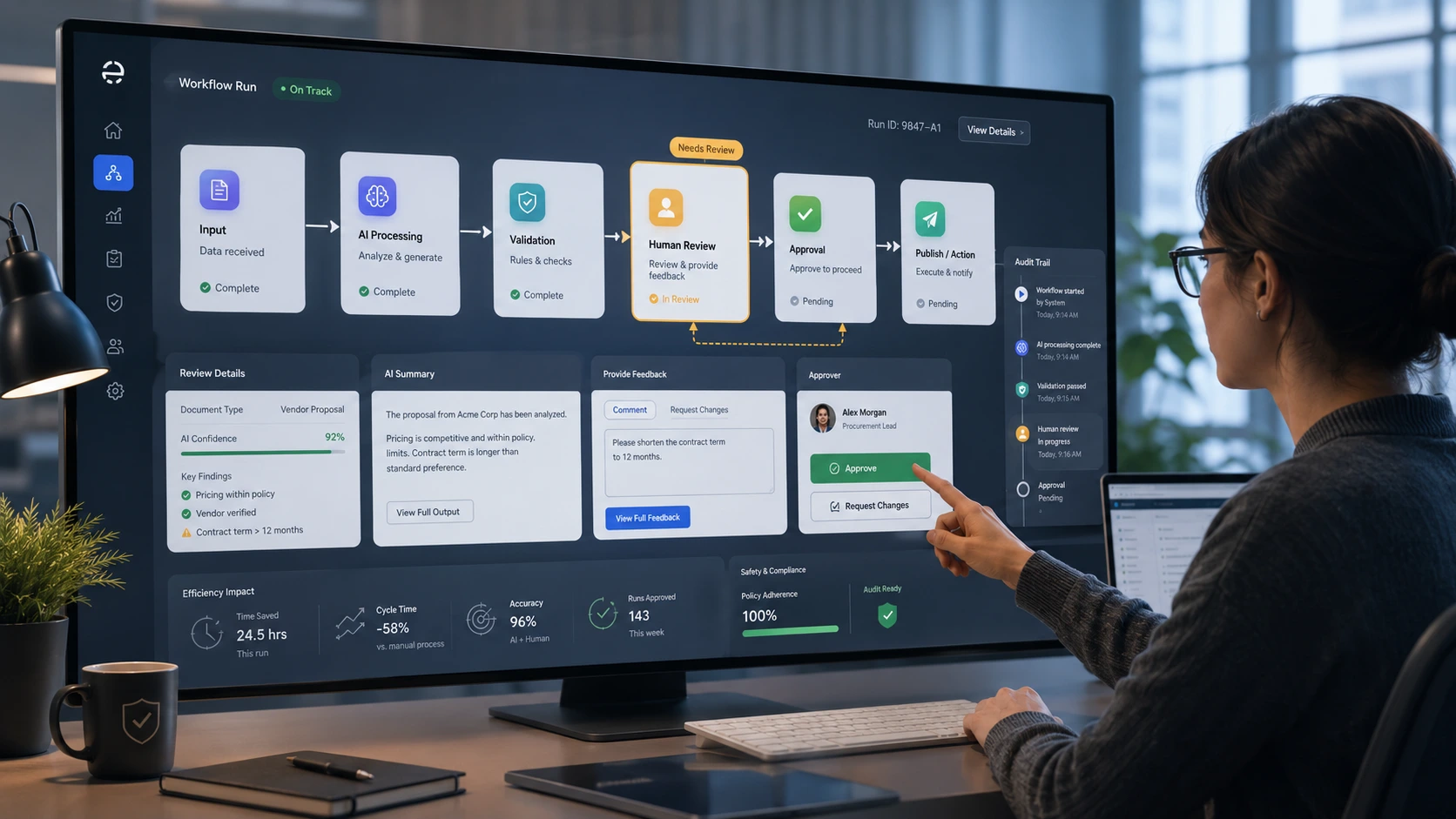
- Show the minimal set of facts required to decide (highlight why the system flagged the item).
- Surface model confidence, rule hits, provenance, change history, and similar past cases.
- Offer explicit choices and one-click overrides; require free-form justification for overrides in risky flows.
- Design for batching where appropriate (reduce context switching) but preserve per-item traceability.
5. Build escalation workflows and automation safety patterns
Escalation workflows are the safety valves for uncertainty and exceptions. Key patterns:
- Confidence thresholds: Route only low-confidence or contradictory cases to humans. Tune thresholds by outcome cost and reviewer capacity.
- Consensus review: Require multiple independent reviewers when stakes are high.
- Tiered escalation: Front-line review → senior reviewer → subject-matter expert, each with increasing SLA and decision authority.
- Kill switch and canary releases: Provide immediate rollback or auto-disable for new automation that exhibits failure patterns.
- Audit trails and immutable logs: Record inputs, model outputs, reviewer decisions, timestamps, and justification for compliance and learning.
Design for graceful degradation: when automation fails or is uncertain, the system should route to the right human, fast—don’t force manual workarounds that create untrackable risk.
6. Instrumentation, KPIs, and continuous feedback
Measure the right things to keep the loop healthy:
- Operational KPIs: throughput, average review time, backlog, and SLA compliance for escalations.
- Quality KPIs: reviewer agreement rate, post-decision error rate, appeals or reversals, model precision/recall on reviewed data.
- Cost KPIs: cost per review and cost per prevented error.
- Feedback signals: use reviewer corrections as labeled data to retrain models and adjust rules.
7. Operationalize with training, governance, and change control
People and process matter as much as code.
- Train reviewers on decision guidelines, edge cases, and how to use the interface. Maintain a living decision handbook.
- Run regular calibration sessions where reviewers discuss disagreements and update guidance.
- Use controlled rollouts and shadow testing for model or rule changes; require sign-off from a governance owner for high-risk changes.
- Automate retention and access controls on audit logs for compliance and privacy.
Concrete examples and scenarios
Two concise scenarios show how the framework translates into design choices.
Content moderation pipeline
- Mode: automation-first pre-filter with assistive recommendations for borderline content.
- Safety patterns: confidence thresholds route borderline items to human reviewers; consensus required for takedowns of verified accounts.
- Metrics: moderation latency, false removal rate, user appeal reversal rate.
- Operations: weekly calibration, reviewer rotation to reduce bias, immutable audit trail for appeals.
Fraud detection for transactions
- Mode: hybrid triage—high-risk items routed to expert investigators; low-risk flagged for automated holds that expire unless reviewed.
- Safety patterns: multi-factor evidence requirement before blocking funds; tiered escalation for high-value transactions.
- Metrics: prevented loss, time-to-resolution, investigator accuracy, number of false holds causing customer friction.
- Operations: SLA-based escalations, case management UI with provenance for forensic review.
Practical checklist to get started
- Inventory decisions and classify by risk and ambiguity.
- Choose the automation split (pre-filter, assist, post-review, or shadow).
- Define confidence thresholds and escalation paths.
- Design reviewer UI with provenance and one-click actions.
- Instrument KPIs and set up dashboards for both ops and model teams.
- Run a shadow deployment for at least one business cycle before activating automated actions.
- Schedule recurring calibration and governance reviews.
Example: minimal review task payload
When integrating a review platform, keep the task payload explicit and lightweight so reviewers can act quickly.
{
"task_id": "12345",
"item_type": "transaction",
"created_at": "2026-06-26T12:00:00Z",
"automation_recommendation": "flag",
"model_confidence": 0.62,
"rule_hits": ["velocity_limit","suspicious_country"],
"provenance": {"user_id":"u998","ip":"198.51.100.12"},
"recent_similar_cases": ["case_1201","case_1202"]
}
Common pitfalls and how to avoid them
- Too much context: Flooding reviewers with data increases decision time. Prioritize signals that change outcomes.
- No feedback loop: If reviewer actions don’t feed model retraining, the automation will stagnate.
- Unclear SLAs: Escalations without SLA guarantees create inconsistent outcomes—define and enforce them.
- Overreliance on a single metric: Optimize across accuracy, speed, and reviewer workload to avoid costly regressions.
Conclusion — iterate toward safer, faster decisions
Human-in-the-loop automation is a design problem as much as an engineering one. Use the framework above to align objectives, choose the right split between people and machines, and instrument the system for continuous learning. Start small—shadow mode and clear SLAs let you de-risk automation while improving throughput and quality. With the right escalation workflows and automation safety patterns, you can scale decisions without giving up human judgement.
Frequently Asked Questions
What is human-in-the-loop automation and when should I use it?
Human-in-the-loop automation combines automated systems with human review for decisions that require judgement, accountability, or when errors are costly. Use it when risks are high (legal, financial, reputational), when models are uncertain or ambiguous, or when regulations demand human verification.
How do I decide which items should be routed to human reviewers?
Route items based on confidence thresholds, rule conflicts, or business-defined risk categories. Start by classifying decision types by their cost of error and ambiguity, then set conservative thresholds in shadow mode and adjust based on reviewer capacity and observed error rates.
What are common automation safety patterns?
Common patterns include confidence thresholds, tiered escalation, consensus review for high-risk cases, shadow mode for validation, canary releases and kill switches for new automation, and immutable audit trails for compliance and learning.
How should I measure the success of a semi-automated workflow?
Measure operational KPIs (throughput, average review time, backlog, SLA compliance), quality KPIs (reviewer agreement, reversal/appeal rates), and cost KPIs (cost per review, cost per prevented error). Also track model performance on reviewed items and use reviewer corrections to retrain models.
How can I prevent reviewer fatigue and bias?
Use batching to reduce context switching, rotate reviewers, run regular calibration sessions, present only the minimal decision context needed, and monitor reviewer agreement and error patterns. Provide clear guidelines and require justifications for overrides in risky cases.